A show is the podcast itself: its name, its cover art and who can listen. Every episode belongs to a show, and you can run as many shows as you like.
Make a show:
- Go to Podcasts, Shows, Add Show.
- Give it a name and a short description. The Excerpt box is the description podcast apps show.
- Set the Featured image as your cover art: square, 1400 to 3000 pixels wide, JPG or PNG. Apple Podcasts and Spotify will not list a show without one, and the show screen tells you if your picture is not square or not the right size.
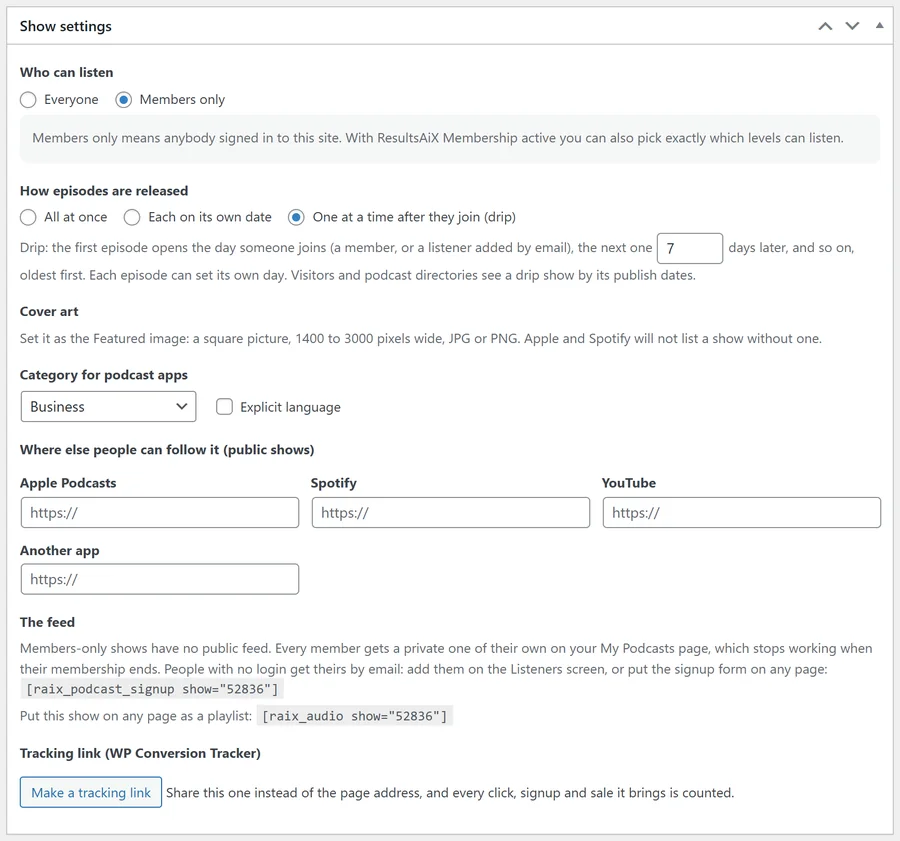
- In Show settings pick its Category for podcast apps, whether it has Explicit language, and, for a public show, where else people can follow it (its Apple Podcasts, Spotify or YouTube links).
- Choose who can listen, then publish.
Who can listen:
- Everyone makes a public show. It has one feed address for Apple Podcasts, Spotify and every other app.
- Members only makes a private show. It has no public feed. Instead every member, and everyone you add as a listener by email, gets a private link of their own.
Sending a public show to Apple Podcasts and Spotify:
Copy the feed address from the Show settings box, or from Your shows on the Dashboard tab with Copy feed address. Submit it once to Apple Podcasts Connect and to Spotify for Podcasters. From then on every new episode reaches the apps by itself.
How episodes are released:
Each show also has How episodes are released: All at once, Each on its own date, or One at a time after they join. See the article on drip release.
Feed details:
On the Settings tab you can set the owner name and email the feeds carry (blank uses your site name and admin email), the default category, explicit, and the language (blank uses your site language).