The Settings tab:
- Your licence card at the top.
- Appearance: the colour scheme of the plugin’s own screens.
- The player: the default look, its colour, Player colours (Follow my theme, Light or Dark), embeds for other websites, the player at the top of every episode page, the transcript under it, and the download button on public episodes.
- Feeds: owner name and email, default category, explicit and language.
- Listeners: send the welcome email, its subject and opening lines, the shows the signup form adds people to, and Email listeners about new episodes (through ResultsAiX Mailer).
- Pages: the My Podcasts page button and the Join link for members-only episodes.
- Count plays: stats on or off.
The AI tab:
Your AI keys for transcripts and writing, with a button to test each one. Under the ResultsAiX Theme, its AI Connect keys are used first.
The Training and Resources tabs:
Training walks through every part of Podcasts a step at a time, with a link to these docs. Resources shows the other ResultsAiX plugins and themes.
Diagnostics:
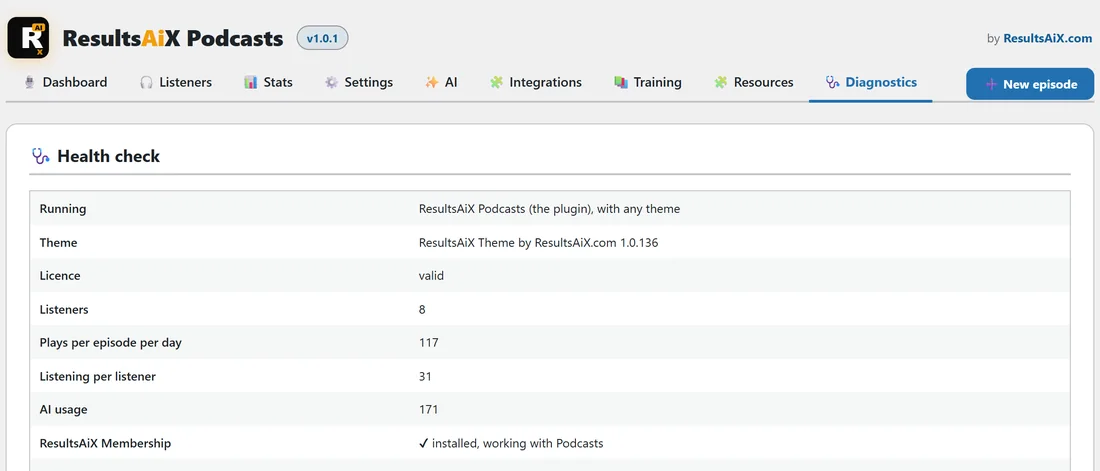
The health check shows whether Podcasts is running as the plugin or inside the ResultsAiX Theme, your theme and version, the licence, each of its tables, and which ResultsAiX plugins are installed and working with Podcasts. Copy report for support copies the lot in one go, to paste into a support ticket.
The error log:
Below the health check, the error log shows the last 24 hours of errors, warnings, slow requests and jobs that never finished, kept for 7 days. Keys and private links are blanked out. Filter it, download it as a text file, or empty it.