A listener is anyone you give a private podcast to with just their email address. They need no account and no password on your site. Each listener gets their own private link by email, with one-tap buttons for their podcast app.
Listeners get members-only shows, so make a show members only first (on the show, Who can listen).
Add one listener:
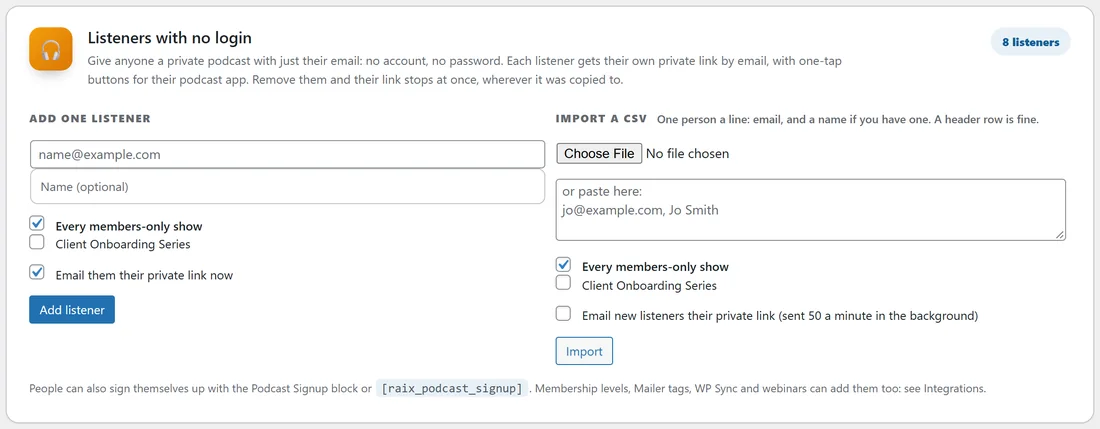
Go to Podcasts, Listeners. Under Add one listener type their email and name, tick the shows they get, and press Add. Their private link is on its way by email straight away.
Import a CSV:
Under Import a CSV choose a file, or paste the addresses into the box. One person a line: the email, and a name if you have one. A header row is fine. Tick the shows they get, and tick Email new listeners their private link if you want the welcome email to go out. Welcome emails are sent 50 a minute in the background, so a big list never slows your site. The result tells you how many were new, how many were already there and updated, and how many lines were skipped.
The signup form:

Put the Podcast Signup block on any page, or the shortcode
where 3 is the show’s ID. People type their first name and email, press Get the podcast, and their private link arrives by email. Leave show out and the form uses the shows set on the Settings tab, or every members-only show. Shortcode options: button=”Your button text”, name=”no” to ask for the email only, title=”A heading above the form”, thanks=”Your own thank-you message”. Someone who signs up again simply gets their link sent again, which is the easiest way back for anyone who lost it.Your listeners list:
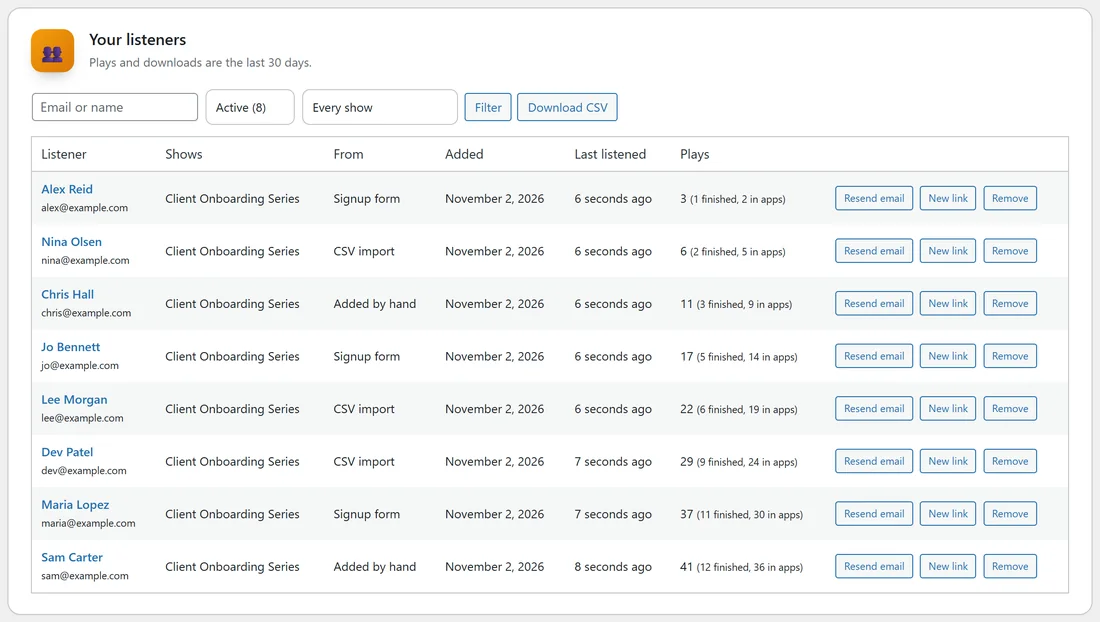
The Listeners screen lists everyone with the shows they have, where they came from (added by hand, signup form, CSV import, membership level, Mailer tag, WP Sync or webinar), when they were added, when they last listened and their plays, with how many they finished and how many times their podcast app fetched an episode. Search by email or name, filter by show, and switch between Active and Removed. Download CSV exports the list.
The buttons on each listener:
- Resend email sends their private link again.
- New link makes them a fresh private link and emails it. The old one stops working in every app at once.
- Remove stops their private link at once, in every app, even if they copied it somewhere. Removed listeners stay in the Removed list.
- Add back returns a removed listener with a new private link. Use Resend email to send it.
Click a listener to see their private links for each show and everything they listened to in the last 12 months.